


Flawless App Releases: Tips to Improve Release Management for Apps
 Andrew BurakCEO and Founder at Relevant Software
Shipping code is no longer the risky part. Activating it is. In the 2025 DORA report, only 16.2% of teams deploy on demand, and elite teams still keep change failure rates in the 0-15% range because they control how a release reaches users, not just when the build passes. That control is what release management delivers. Get it right and a launch or update lands quietly. Get it wrong and a single bad deploy takes down the product and your weekend. After building more than 200 software solutions for clients, we have seen both. This guide walks through the process, the phases, a working checklist, version control, and the DevOps tools that keep app releases predictable in 2026. It is written for release managers, engineering leads, and founders who own the ship button.
What is release management?
Release management is the process of planning, organizing, managing, and controlling software development stages from coding to market launch. It sits at the intersection of business planning, IT service management, and the software development lifecycle.
You will hear DevOps, CI/CD, Agile development, and automation come up in any release conversation. In 2026, add two more terms to that list: feature flags and progressive delivery. We will make sense of all of it. Start with the whys, then move to the hows.
Why do you need it?
Companies use release management so nobody breaks a product update or launch. And when something does break, the process makes the issue easy to spot and fast to fix. That matters more now that AI writes a large share of committed code. DORA’s 2025 research found that rising AI adoption correlates with more delivery instability, which puts extra weight on disciplined releases.
The main benefits:
- more accurate planning and resource distribution;
- a more efficient software lifecycle;
- less pressure on support due to fewer incidents;
- minimal impact of changes on users;
- better version control.
Release management phases
Here is what the release management lifecycle looks like. Check out the scheme.
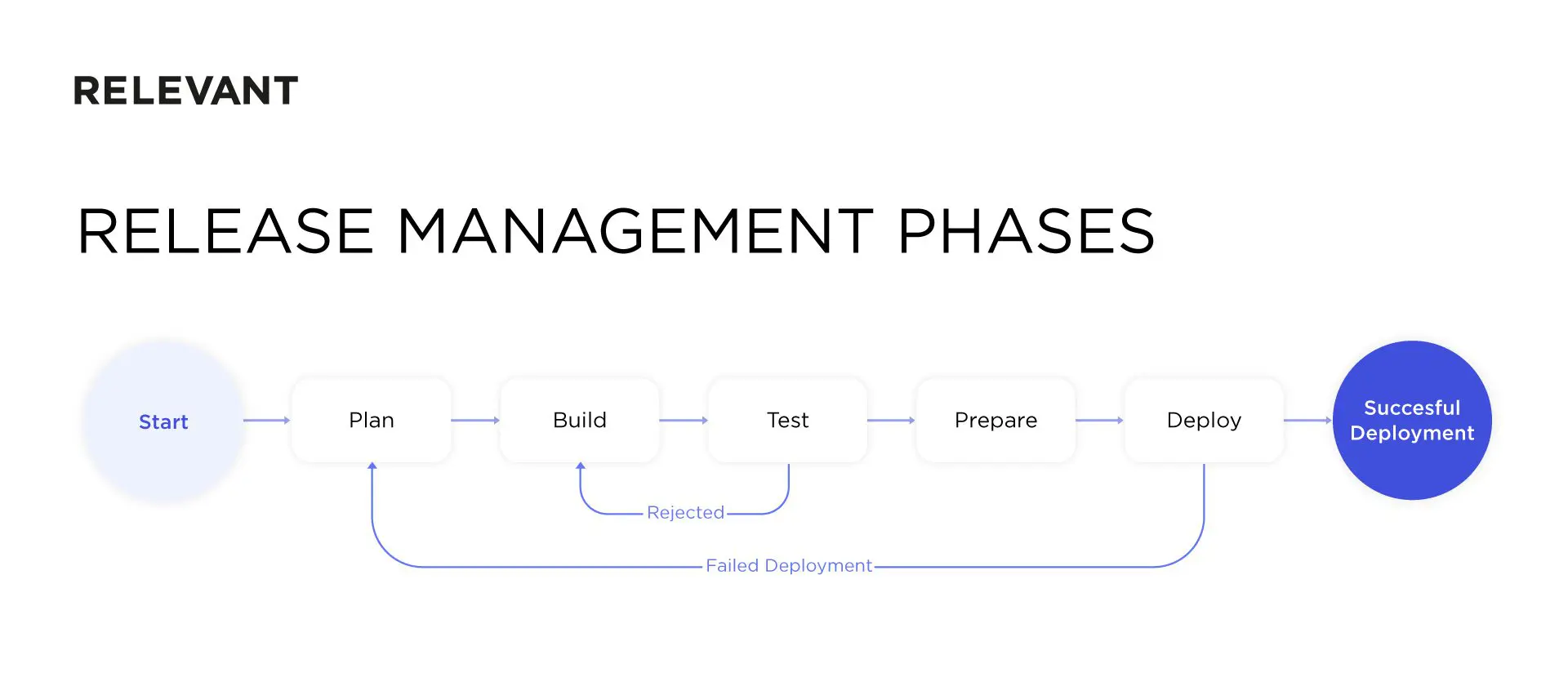
Everything starts with planning, continues with the build and test cycle until the work is done and stable, and ends with deployment. After deployment, the manager captures user feedback and reviews performance targets. If the release holds, the job is done. If not, the team learns the lesson and runs the process again. Modern pipelines add one more step in the middle: the release manager can deploy code to production disabled behind a feature flag, then turn it on later. Pushing code and activating a feature are now two separate decisions.
The role of DevOps in release management
Enterprise organizations usually keep full-time DevOps engineers on staff, while smaller companies often operate without them. Either way, an established DevOps culture is what makes releases repeatable. Our own DevOps transformation guide covers how teams build that culture step by step.
Core DevOps principles change the relationship between operations and development so teams collaborate better, build and deploy features continuously, and cut the time between release phases. The measure of success is the DORA four keys: deployment frequency, lead time for changes, change failure rate, and mean time to recovery. In 2024 DORA added a fifth, rework rate. When we build software for clients, we apply DevOps practices on projects of any size.
Release checklist
A release checklist aligns the work of every team, from design and development to customer support and sales.
The easiest format for release checklists
Whatever you prefer, Google Sheets, Trello, Notion, or Linear, make three main columns: task, owner, and status.
Tasks
List every single task the release needs: software development, communication, legal and financial items, customer support, and so on. Do not assume anything is obvious, because it is not. If a task is not on the checklist, it probably will not get done.
Owner
When no one is accountable, responsibility diffuses and everyone assumes someone else has it covered. Use this column to name the person responsible for each task.
Status (to do, in progress, done)
This column helps you oversee the process and clear any barriers to finishing the job.
What to include in a release checklist
Your job as a release manager is to create the conditions for a successful release.
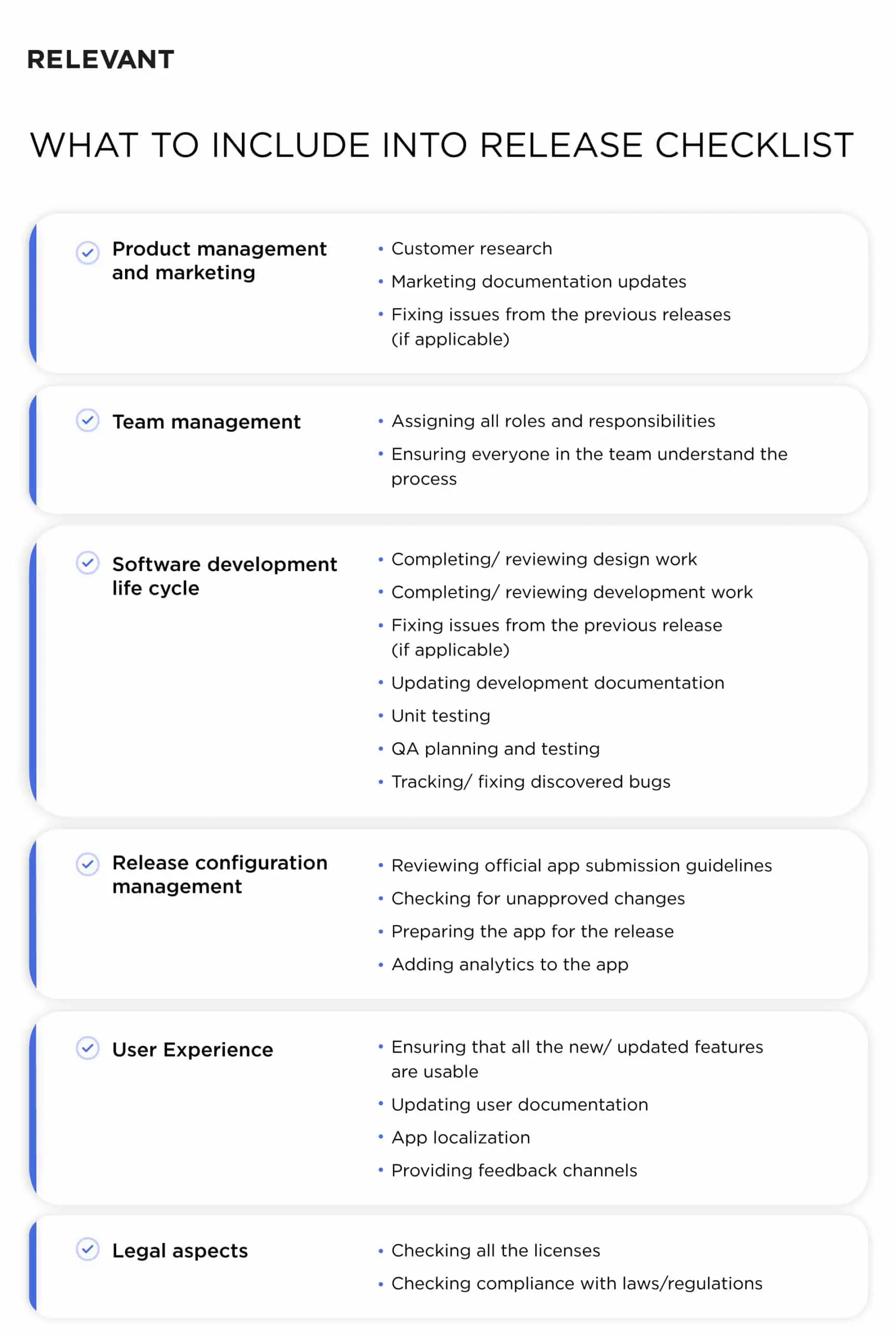
Use the checklist below as a template and adapt it to your company. It gives you more control over the key release aspects.
Product management and marketing
- Customer research
- Marketing documentation updates
- Fixing issues from previous releases (if applicable)
Team management
- Assigning all roles and responsibilities
- Making sure everyone on the team understands the process
Software development life cycle
- Completing and reviewing design work
- Completing and reviewing development work
- Fixing issues from the previous release (if applicable)
- Updating development documentation
- Unit testing
- QA planning and testing
- Tracking and fixing discovered bugs
Release configuration management
- Reviewing current App Store and Google Play submission guidelines
- Checking for unapproved changes
- Preparing the app for release
- Wrapping risky changes in feature flags
- Adding analytics to the app
User Experience
- Making sure all new and updated features are usable
- Updating user documentation
- App localization
- Providing feedback channels
Legal aspects
- Checking all licenses
- Checking compliance with laws and regulations
Modify this checklist to fit your organization.
What is version control?
The hardest part of release management is often version control. It tracks code changes between updates and lets you revert if something goes wrong.
Version control helps because it:
- speeds up development;
- reduces the fallout from human error;
- keeps code history and lets you revert changes at any moment;
- integrates with IDE (Integrated Development Environment) tools.
Git is the version control system almost every team runs on, and GitHub is the most popular platform built around it. GitHub is easy to learn, easy to use, and a convenient repository for effective collaboration. It also runs your pipelines: GitHub Actions handles your CI/CD pipelines directly in the repo, so build, test, and deploy steps live next to the code.
The goal of GitHub flow is to:
- Be simple enough to remember.
- Be simple enough to follow.
- Support CI/CD.
With a solid branching strategy, you spend less time managing code and more time developing it.

How to create GitHub flow step-by-step
Good news: the workflow is far simpler than the branching models teams wrestled with a decade ago.
Step #1 – Create branches
The main branch is your deployable production code. It is the default branch, so whenever someone fixes a bug or builds a feature, they create a new branch with a descriptive name. That makes it easier for others to understand what is happening inside.
Step #2 – Add commits
Changes within a branch are commits. Every time someone edits, deletes, or adds a file, they add a commit to the branch. Commits create a transparent history, so keep every commit message clear. That lets the team follow progress and give feedback.
Step #3 – Review the code in pull requests
Pull requests are where you discuss code changes, request adjustments, and collect feedback inside GitHub. Use the @mention system to keep communication tight, and track progress in the unified pull request view.
Step #4 – Deploy
After reviewing pull requests and testing the branches, deploy your changes for verification in production. GitHub lets you deploy from a branch for final testing before merging to main. Pair this with a progressive delivery strategy, canary or blue-green, so a new release reaches a small slice of users first and rolls back fast if something breaks.
Top five useful release management tools besides GitHub
Below are some of the most helpful open-source DevOps tools for optimizing your release management process.
Jenkins
Jenkins is an open-source automation server that helps developers build, test, and deploy software. It remains one of the most widely used CI/CD tools. Like GitHub, it integrates with Git repositories and helps plan releases, source code, and keep deployments on schedule.
Docker
Docker is a software packaging and delivery platform that lets you build, run, and manage software in isolated packages on a single operating system. Each container bundles its own software, libraries, and configuration files. In production, teams usually run these containers at scale with Kubernetes.
Salt (SaltStack)
The Salt Project, formerly branded SaltStack, is an open-source automation tool for stabilizing, packaging, configuring, and deploying code. With Salt you can plan the release schedule, manage development branches, coordinate teams, and automate testing and deployment. It stays actively maintained under Broadcom after the VMware acquisition.
Ansible
Ansible handles configuration management, application deployment, and cloud provisioning. Use it to shorten and automate the feedback loop during the software development process. It also integrates with other DevOps and cloud automation tools like Git, Jenkins, and more.
Chef
Chef is an open-source CI/CD tool for automating and managing releases in cloud-native and traditional environments. It is especially useful for compliance and security tasks and can improve the reliability and speed of your apps and infrastructure.
Conclusion
Plan the release carefully and use the right tools and practices to optimize team efficiency. Add feature flags, progressive delivery, and DORA metrics to the mix, and a clean deployment stops being luck. If you want experts to own this for you, the DevOps team at Relevant will help. Contact us for details.


