


How Invoice Automation Can Transform Your Business
 Andrew BurakCEO and Founder at Relevant Software
How much does each invoice cost your company to process?
Most finance teams still key invoice data by hand. In 2026, 68% of accounts payable teams still enter invoice data manually, and only 8% run a fully automated process. That manual work is expensive. Ardent Partners puts the fully loaded cost of processing one invoice at about $10.89, while best-in-class teams using AI capture and automated matching process the same invoice for $2.78.
The gap is not small. For a business handling 500 invoices a month, the difference works out to roughly $60,000 a year in avoidable cost. Automation closes that gap, and it does more than save money. It removes manual entry, cuts errors, and speeds up approvals, which frees your finance team to focus on fintech software development priorities that actually move the business.
The market reflects this shift. The AP automation market reached an estimated $6.94 billion in 2026 and is growing at about 12.4% a year, driven by AI, intelligent document processing, and a wave of e-invoicing mandates across the EU. This article draws on Relevant’s work with clients moving to automated invoicing. We’ll cover:
- The automated invoice processing workflow and its benefits
- The main features and challenges of invoice automation
- How to choose between ready-made and custom invoicing software development
How does automated invoicing work?
Manual invoice processing can take up to 15 steps, depending on the company and industry. In an automated environment, that drops to about four.
Here is how a typical manual workflow runs. First, your accounting team receives an invoice. Staff check its type and match it with supporting documents such as a purchase order (PO) or delivery receipt. Next they verify approval from the relevant authorized person, and request it if it is missing. Once approved, the team submits the invoice to the accounting system, where it waits for payment. After payment, they archive the invoice and its payment information.
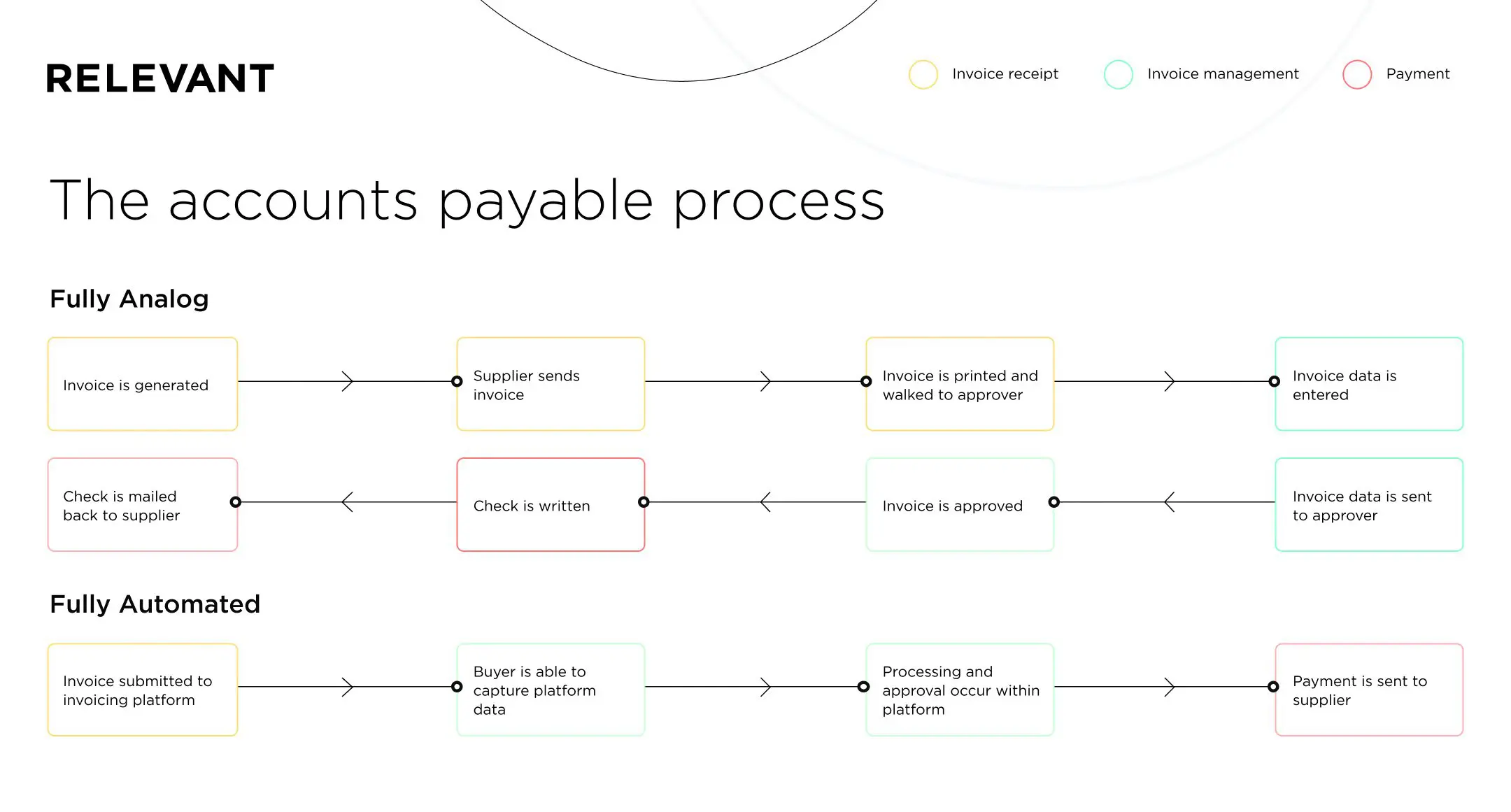
Now compare the automated workflow. When an invoice arrives, the software reads it and converts the data into a searchable document. It can also flag emails with attached invoices for extraction or monitoring. If the layout is new and the software cannot extract some fields, it routes the invoice to staff for a quick manual check.
Verification runs automatically too. The software checks the invoice against tax rules, screens for duplicates, and cross-checks related documents to confirm the invoice is valid.
This removes hours of manual entry and the errors that come with it. Modern systems use AI and intelligent document processing (IDP), so the software learns which fields to capture and register in your ERP. It routes invoices to the right approvers, and it keeps all comments and remarks inside the system where your team can find them.
The benefits of invoice automation
Companies using invoice automation feel the benefits in four main areas.
Cost and time savings: Automation cuts the cost per invoice and shortens cycle times. Ardent Partners reports that best-in-class AP teams reach about 49% touchless processing against an industry average near 33%, meaning far fewer invoices need a human hand.
Enhanced productivity: Less manual work frees your team to focus on higher-value tasks. Removing manual entry also cuts errors, and roughly 39% of manually processed invoices contain some form of error today.
Robust data consistency and security: Automation software checks incoming invoices for inconsistencies, duplicates, or invalid payments, which reduces the risk of fraud. Centralizing invoices improves visibility, while strict fintech security requirements protect the data. Automation links invoices directly with authorized approvers, which tightens control.
Earlier payment: A faster approval process lets your company capture early payment discounts. Paying on time also strengthens supplier relationships, which leads to more savings later.
Now that you have seen how invoice automation streamlines the workflow, it is time to think about which solution fits your company best.
Is custom invoicing software better than ready-made solutions?
There are two primary choices when it comes to adopting invoice automation:
- A ready-made solution
- Custom invoice software development
A third option, if your company already uses accounting software, is to customize it with automated invoice processing tools. Many financial management systems offer this feature, so check with your system provider. Keep in mind that you usually get limited functionality, and such software rarely meets specific needs. Customizing complex ERP systems such as Oracle EBS or SAP can also take significant time and cost a fortune.
Ready-made cloud software
Ready-made software works if you want basic features such as automated reminders and invoice templates. It is easy to adopt because it has an intuitive interface. Your finance team can start almost immediately, with little time spent on training and setup.
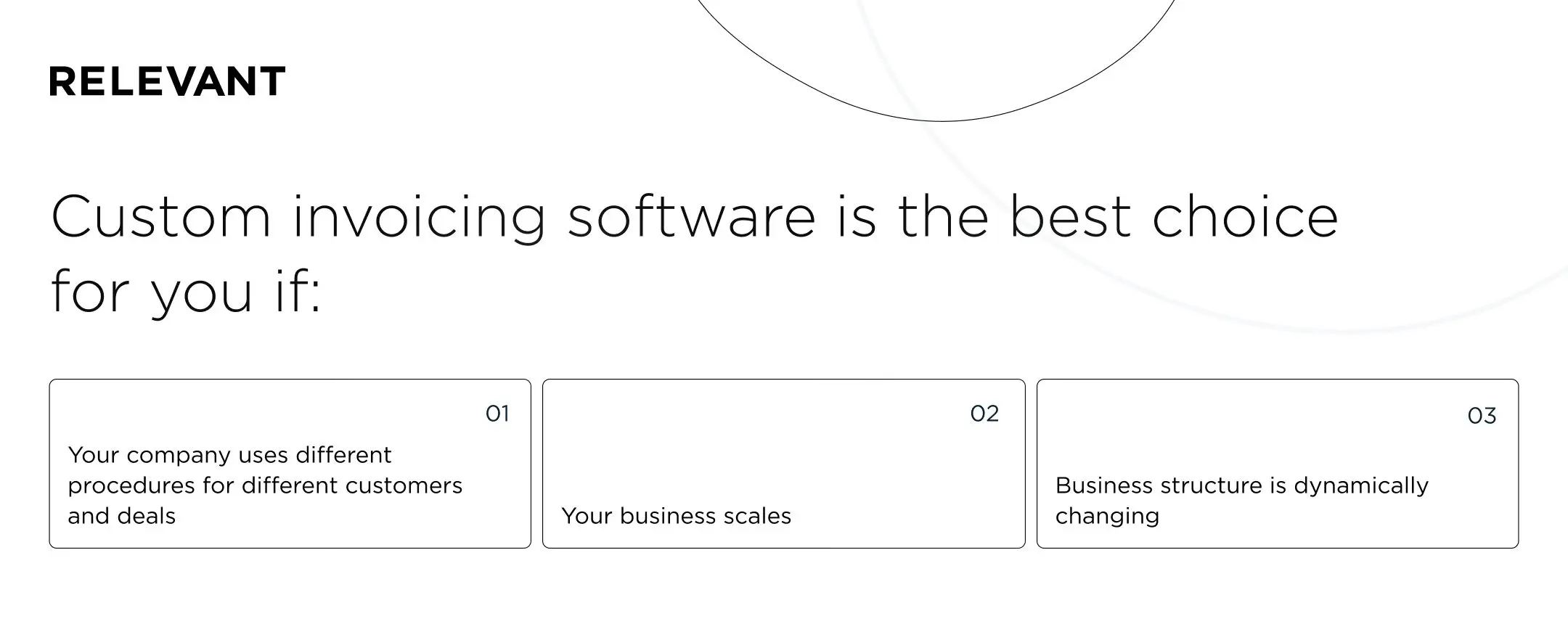
The downside is that ready-made software offers standard functions and cannot handle unique invoices or complex processes. If your company uses different procedures for different customers, a ready-made solution will fall short. The same applies if you run a complex system of discounts, premiums, and limits, or if compliance rules require different invoice templates for certain customers. In those cases, you will likely need fintech software development services.
Cost is the final point. Monthly subscriptions to reliable software are not cheap, and the cost accumulates over time. In the long run, SaaS billing software can work out more expensive than custom invoice software.
Custom invoicing software development
So is custom development right for you? Before you start searching for an invoice processing software development guide, ask two questions:
- Do you have specific needs that no solution on the market solves well?
- Is your business structure dynamic or likely to change or scale soon?
If the answer to either question is yes, you are reading the right section.
Off-the-shelf software often forces you to fit your workflow to the product. A custom solution does the reverse and meets your business needs. With a team of experienced developers, you can build advanced functionality on a par with complex invoice banking software.
Custom-built software uses a modular architecture, so it scales easily and adds functionality when you need it. It also integrates with your existing ERP and Customer Relationship Management (CRM) systems.
The right choice comes down to how complex your needs are. For basic invoicing, customize your existing financial software or pick a ready-made cloud solution. If your needs are complex or your business structure will change, custom software development is the better path. Our work on personal finance app development shows how a purpose-built product can handle requirements that packaged tools cannot.
Invoice automation features
Now let’s look at the features of invoicing software. Whether you choose a ready-made solution or custom invoice software development, these are the terms you will hear often.
Multi-channel invoice capture
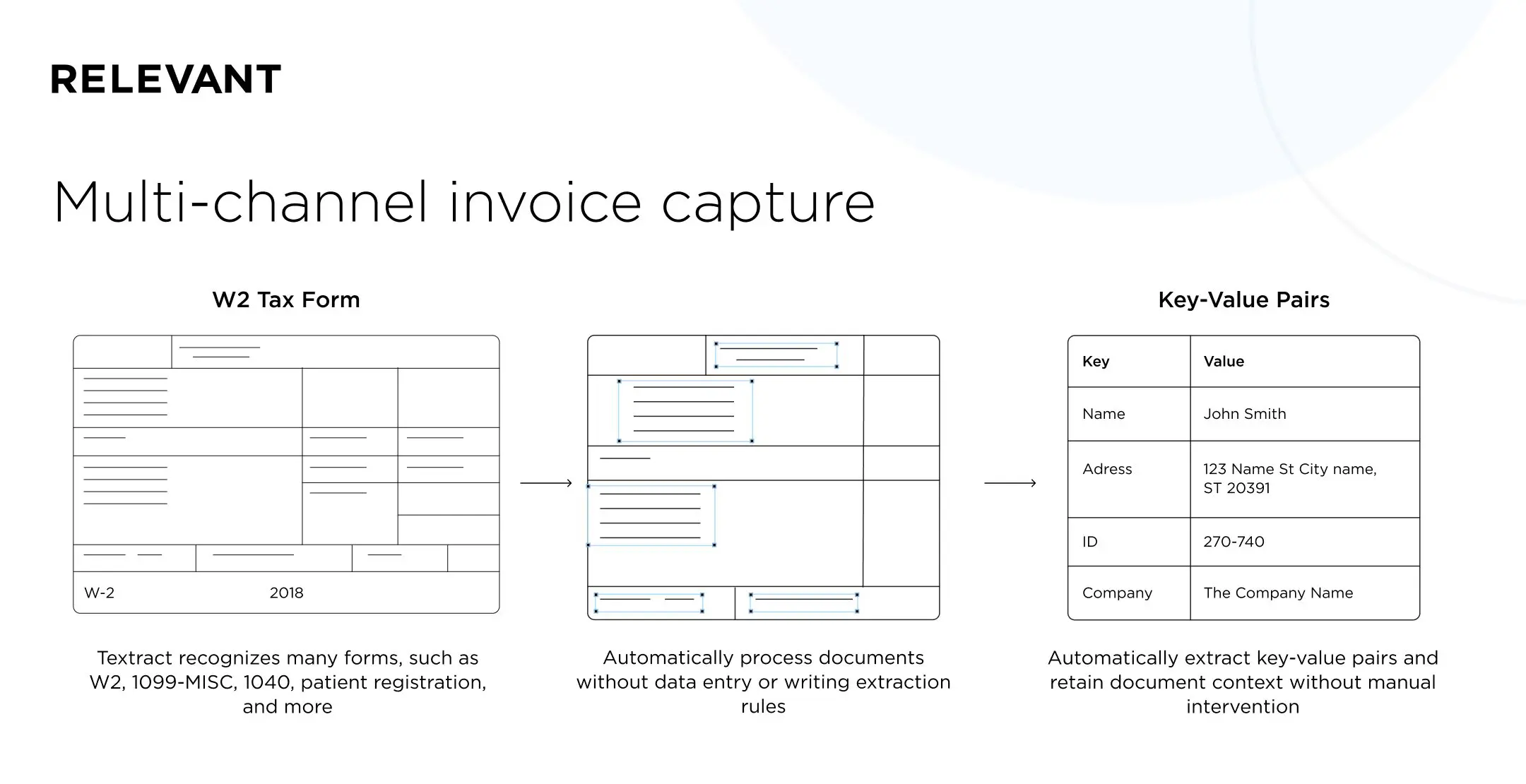
Invoice capture (or data capture) lets an automation system extract information from a document, match it with related documents such as a PO or delivery receipt, and convert the data into a searchable format. Multi-channel capture handles the invoice regardless of its original format, whether that is XML, PDF, an image, email, or a hard copy.
Optical character recognition (OCR) and IDP
OCR is the core technology behind data capture. It recognizes and extracts information in digital documents and assigns the data to the right fields. On its own, OCR only converts characters to text. That is why modern systems pair it with intelligent document processing (IDP), which reads document context, extracts structured data from unstructured sources, and improves through human feedback. The result is higher accuracy on real-world invoices.
Purpose-built AI
Recording and verifying data is not a simple linear process. Financial documents are variable, and every company has its own templates. Machine learning and AI let automation software spot exceptions and recognize patterns case by case. The software reads invoice layouts and detects the right data without human intervention, whatever the format. The 2026 frontier is agentic AI, where goal-driven systems run AP work end to end within set guardrails and escalate only genuinely ambiguous cases to a person.
Electronic invoicing and e-invoicing mandates
An automated invoicing system digitizes the whole document life cycle: issuing, transmitting, receiving, and processing. Paired with a payment gateway, e-invoicing saves significantly compared to PDF and paper-heavy invoices. It offers a secure, traceable document journey, transparent real-time processing, remote handling, and higher accuracy through less manual work.
E-invoicing is also becoming a legal requirement. The EU’s VAT in the Digital Age (ViDA) framework pushes member states toward mandatory B2B e-invoicing, and several mandates went live in early 2026. France requires large and mid-sized companies to receive e-invoices from September 2026, and Belgium moved to mandatory B2B e-invoicing over the PEPPOL network in 2026. If you operate in the EU, choose software that supports structured formats and PEPPOL, not just PDF capture.
Workflow automation
Automated invoice processing creates a transparent, traceable workflow. Comments, remarks, and approvals stay inside the software and are easy to access, while automated reminders speed up approvals.
Purchase order (PO) matching
Automated PO matching lets your company set configuration guidelines for each seller and verify invoices for compliance. It also checks automatically that the amounts on the invoice and the PO match.
KPI/SLA management
Automation lets you monitor performance and service-level agreements (SLAs) tied to invoice processing. Tracking these metrics gives you a clearer view of payment flows and financial compliance, which supports better planning.
ERP integration
Off-the-shelf systems integrate easily with simple ERP solutions, which saves time and improves ROI. If your company runs a complex ERP, consider custom invoicing software that integrates directly with your setup, without lengthy configuration and modifications.
What are the challenges with automating an invoice?
When you trial solutions or talk to a vendor, weigh these two challenges.
How well will the solution handle the diversity of your documents? Financial documents do not follow a standard template. Every company uses its own layout, and critical information can appear in different places. Creating a large number of invoice templates does not solve the problem, because even those cannot cover every layout.
How well will it cope with poorly scanned documents? “Noise” on scanned invoices is another issue. Invoices often get scanned at an angle, bundled with other documents, or degraded by low-quality office equipment.
If you want your software to read noisy real-world invoices, recognize patterns, and extract data without human intervention, choose a solution that combines invoice capture with OCR, IDP, and AI. Processing invoices this way is a self-learning process, so even when the software cannot fully read a document, it learns from the correction. You will not need to step in again when a similar invoice arrives.
Summary
Invoice automation cuts the cost of each invoice, removes errors, and speeds up payments. With AI and IDP now mainstream and e-invoicing mandates spreading across the EU, the sooner your business moves to automated invoicing, the easier it will be to stay competitive and compliant.
At Relevant, our experience in fintech and personal finance app development puts us in a strong position to deliver custom payroll automation solutions. If you want automation that fully addresses your company’s needs, we can build custom invoice software that reduces both your development and management burden. Contact us for a consultation.


